Stable Diffusion · SDXL 1.0
Woodcut Barn Owl Print
Tested: 2026-08-01
2:3 · 516 × 768
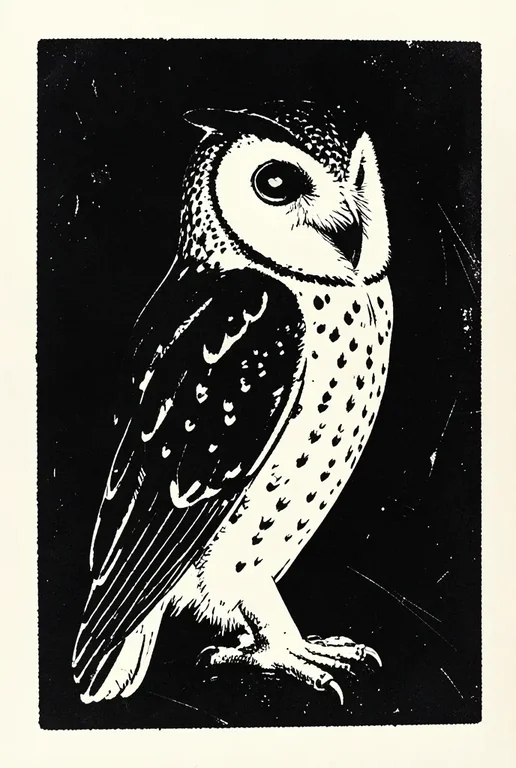
The prompt
Prompt
A relief woodcut print of a barn owl in three-quarter view, bold carved black ink on cream paper, white negative space forming the facial disc and chest speckles, rough gouge marks visible in the dark background fields, simplified feather masses rather than individual barbs, slight ink squash at the edges of large black areas, flat print look, no colour, no text, no signatureNegative prompt
This entry was tested with a negative prompt as well. It goes in the separate negative field, not appended to the prompt above.
Negative prompt
blurry, low quality, photorealistic, smooth gradient, soft airbrush, text, watermark, watermark signature, extra eyes, deformed beak, muddy brownsHow to use this prompt
- 1
Open the generator that matches the model and version above, and start a new image rather than editing an existing one.
- 2
Set the output to 2:3 and apply the settings shown in the parameters panel — together those produced the 516 × 768 image on this page.
- 3
Paste the prompt exactly as written. Changing the wording changes the image, so copy it before you edit.
- 4
Paste the negative prompt into the separate negative field; this entry was tested with one.
- 5
Generate, then change one thing at a time. The result will not be pixel-identical to the image on this page, because no seed is recorded for it.
Stable Diffusion exposes the sampler, step count, and CFG scale as separate settings, and this entry uses all three. If you are trying to reproduce this image, match the sampler name exactly and keep the step count and CFG as recorded — they are part of the recipe, not decoration.
Related prompts
More prompts from the same model, and prompts that share a use case with this one.
Stable Diffusion
Horror Comic Book Tee
Stable Diffusion
3D Render Stone Sculpture on Pedestal
Stable Diffusion
Abstract Fractal Voronoi Cellular Pattern
Stable Diffusion
Abstract Risograph Overlapping Halftone
Stable Diffusion
Ambient Album Cover: Gradient Sphere
Stable Diffusion
Andalusian Palace Arched Corridor