Midjourney · v7
Millinery Hat Block Studio
Tested: 2026-08-01
3:2 · 768 × 516
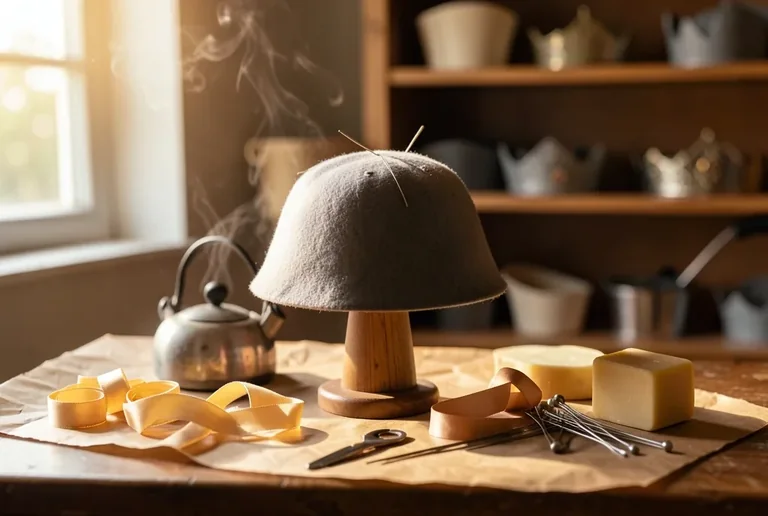
The prompt
Prompt
A milliner's studio table with a wooden hat block standing upright, a partly formed felt cloche still damp and pinned over the crown, steam from a nearby kettle catching side light, rolls of grosgrain ribbon, a block of beeswax and a handful of millinery needles laid out on brown paper, shelves of unfinished crowns and brim shapes soft in the background, warm late-afternoon window light from the left, no people, no brand labels, no text --ar 3:2 --stylize 160How to use this prompt
- 1
Open the generator that matches the model and version above, and start a new image rather than editing an existing one.
- 2
Set the output to 3:2 and apply the settings shown in the parameters panel — together those produced the 768 × 516 image on this page.
- 3
Paste the prompt exactly as written. Changing the wording changes the image, so copy it before you edit.
- 4
Generate, then change one thing at a time. The result will not be pixel-identical to the image on this page, because no seed is recorded for it.
Midjourney takes the aspect ratio as a parameter appended to the prompt rather than as a separate control, written as --ar 3:2, and --stylize followed by a number controls how far the model pushes its own aesthetic. Append both to the end of the prompt text instead of looking for fields for them.
Related prompts
More prompts from the same model, and prompts that share a use case with this one.