Prompt techniques · Camera angles
How to Describe Camera Angles in AI Image Prompts
Describe where the camera sits and which way it points. Clear position and viewing direction give image models more to work with than a vague request for a cinematic angle.
Published: September 30, 2026
By ImagePromptBox Team
8 min read
“Cinematic camera angle” sounds useful in a prompt, but it doesn't tell the image model where the camera actually is.
A better approach is surprisingly literal: describe the camera's position relative to the subject, then say which direction it's looking.
camera below the subject, looking upward is much harder to misunderstand than simply asking for a “dramatic angle.”
The easiest way to see why is to keep everything else the same.
Start With the Same Image
For the examples below, we'll use one simple scene:
A young woman standing on a quiet city street, wearing a black jacket, natural daylight, photorealisticNothing fancy yet.
The subject, location, clothing, lighting, and style stay the same. We'll only change where the camera is.
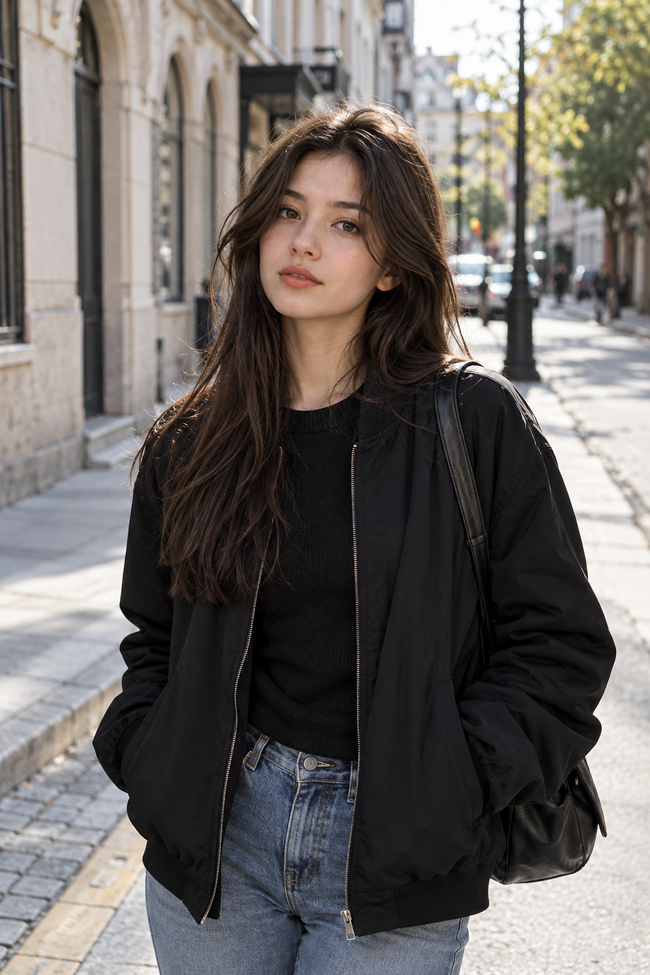
The base prompt doesn't name a camera angle, but the result is already close to an eye-level view.
This matters when testing camera angles. If you change the lighting, pose, environment, and camera position at the same time, it's difficult to tell which instruction actually caused the difference.
Eye Level: The Neutral Starting Point
Start with the camera roughly at the subject's eye height.
A young woman standing on a quiet city street, wearing a black jacket, natural daylight, photorealistic, eye-level shot, camera positioned at the subject's eye height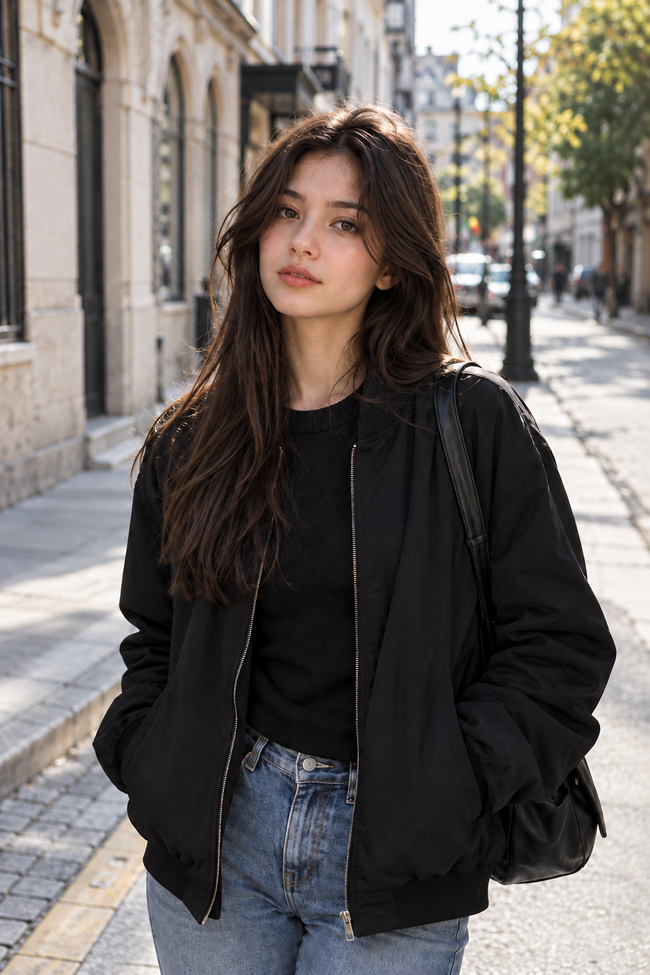
Eye level usually feels neutral because the viewer isn't obviously looking up or down at the subject.
It's a useful baseline.
More importantly, eye-level shot gives us something to compare the other angles against.
What I Noticed: The model defaults to an eye-level view here, so adding an explicit eye-level instruction barely changes the result.
Low Angle: Put the Camera Below the Subject
Now move the camera down.
A young woman standing on a quiet city street, wearing a black jacket, natural daylight, photorealistic, low-angle shot, camera positioned below the subject, looking upward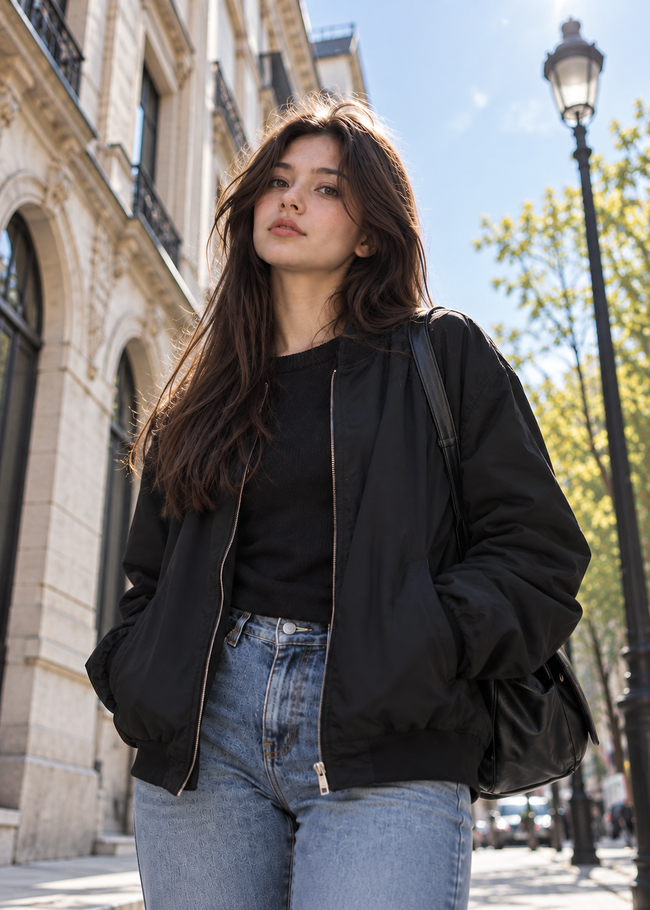
The important part isn't really the phrase low-angle shot.
It's this:
camera positioned below the subject, looking upwardThat describes the geometry of the shot.
Compared with eye level, a low angle can bring more sky or upper background into the frame. Depending on how close the virtual camera is, the lower body may also become more prominent because of perspective.
If low-angle shot alone gives you an image that's still too neutral, make the camera position more explicit:
camera near ground level, looking upward at the subjectThat's a much stronger instruction.
High Angle: Move the Camera Above
The opposite is straightforward:
A young woman standing on a quiet city street, wearing a black jacket, natural daylight, photorealistic, high-angle shot, camera positioned above the subject, looking downward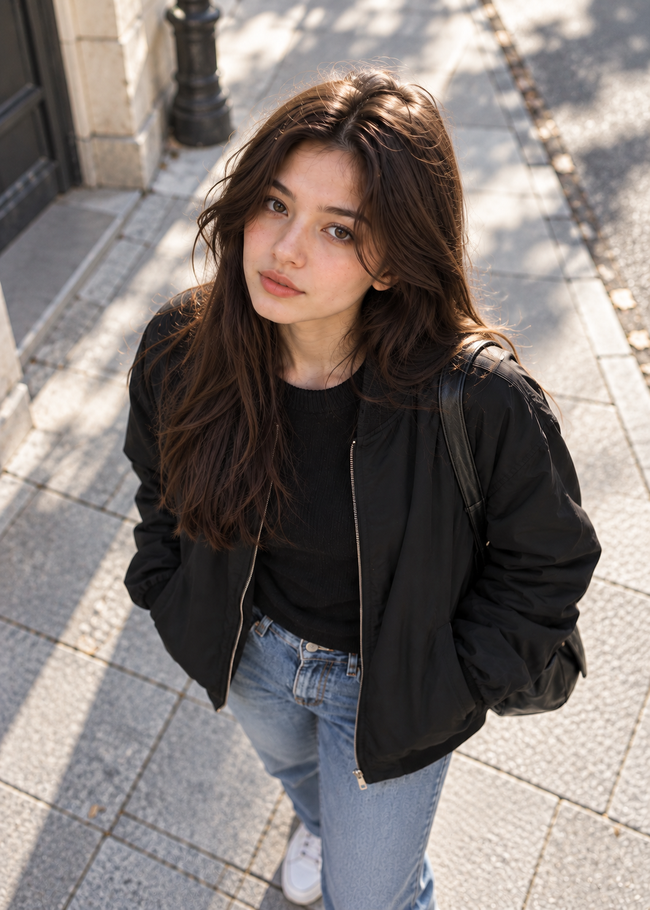
Now we're looking down.
This tends to expose more of the ground around the subject and changes how the body sits inside the frame.
There's also an important distinction here:
High angle doesn't necessarily mean top-down.
The camera can be somewhat above the subject and tilted downward while still showing the face, body, buildings, and horizon.
That isn't the same composition as putting the camera directly overhead.
Bird's-Eye View: Position Matters More Than the Name
For a true overhead image, be specific:
A young woman standing on a quiet city street, wearing a black jacket, natural daylight, photorealistic, bird's-eye view, camera directly above the subject, looking straight down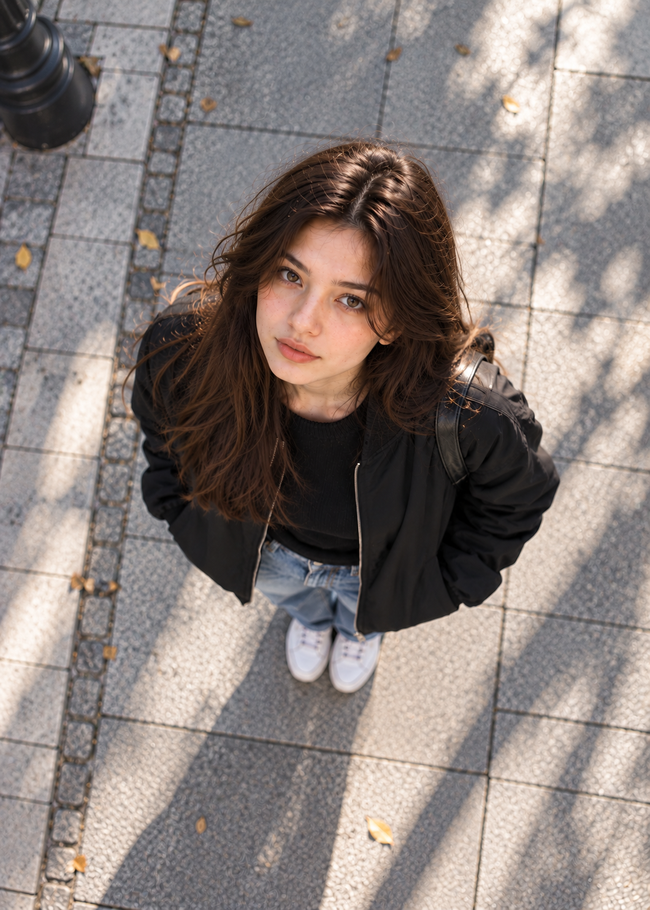
The phrases directly above and looking straight down do most of the useful work here.
Compare that with:
bird's-eye viewThe shorter version may work, but it leaves more room for interpretation. You might get an elevated three-quarter view instead of a true overhead composition.
This is a pattern worth remembering:
Name the angle, then describe the geometry.
Worm's-Eye View: Go Lower Than “Low”
A worm's-eye view is an exaggerated low angle.
Instead of placing the camera slightly below eye level, put it close to the ground:
A young woman standing on a quiet city street, wearing a black jacket, natural daylight, photorealistic, extreme worm's-eye view, camera at ground level near the subject's feet, looking sharply upward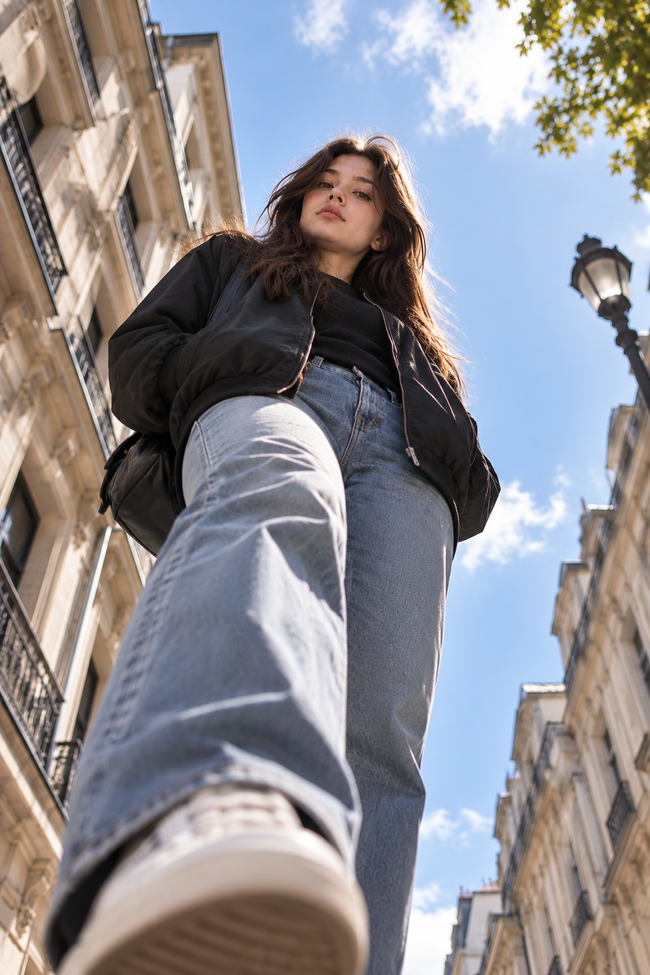
This should look noticeably different from a regular low-angle shot.
Perspective becomes a much bigger part of the image. Objects close to the camera can appear disproportionately large, while the upper body and background recede into the distance.
That's also why adding more extreme angle words isn't always better.
dramatic cinematic extreme low-angle worm's-eye perspectivesounds descriptive, but it still leaves a basic question unanswered:
Where is the camera?
Camera at ground level near the subject's feet, looking sharply upward answers it.
Over-the-Shoulder Needs a Second Relationship
Not every camera angle is just “higher” or “lower.”
An over-the-shoulder shot depends on the camera's relationship to both the foreground subject and whatever they're looking at.
For example:
Two people talking on a quiet city street, over-the-shoulder shot from behind the first person, their shoulder and back of the head visible in the foreground, camera facing the second person's face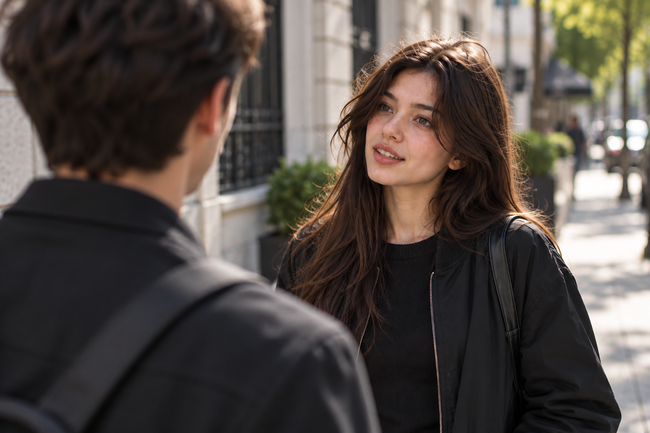
Simply writing:
over-the-shoulder shotdoesn't specify whose shoulder we're behind or what the camera should be facing.
This is where spatial descriptions become much more useful than photography terminology alone.
A Dutch Angle Changes the Horizon
A Dutch angle works differently again.
The camera doesn't necessarily move above or below the subject. Instead, it rotates.
A young woman standing on a quiet city street, wearing a black jacket, natural daylight, photorealistic, Dutch angle, camera tilted clockwise, diagonal horizon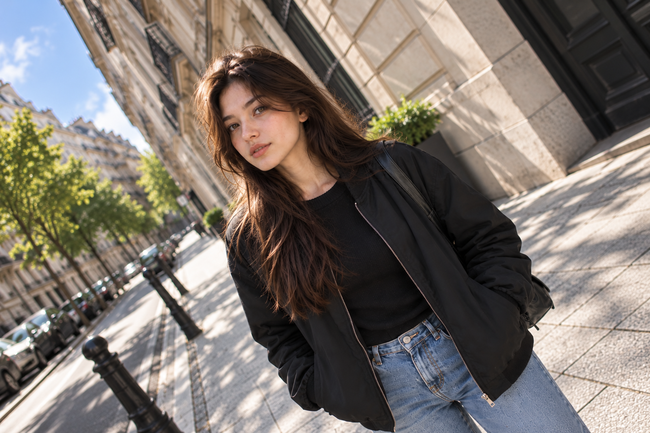
Here, diagonal horizon is useful because it describes the visual result we're trying to create.
If the tilt is too subtle, you can make it more explicit:
strong Dutch angle, camera noticeably tilted clockwise, buildings and horizon running diagonally across the frameNotice that we're still describing something visible rather than stacking adjectives like dynamic, dramatic, and cinematic.
Camera Angle and Shot Size Aren't the Same Thing
This is where prompts often get muddled.
These two instructions control different things:
low-angle shotand:
close-up portraitThe first describes where you're viewing the subject from.
The second describes how much of the subject appears in the frame.
You can combine them:
close-up portrait, low-angle view, camera slightly below the subject's face, looking upwardOr:
full-body shot, low-angle view, camera near ground level, looking upwardBoth are low-angle images, but they won't produce the same composition.
The same applies to wide shot, medium shot, close-up, and extreme close-up. Don't treat them as alternatives to camera angles. They solve a different part of the prompt.
What Actually Matters in a Camera Angle Prompt
You don't need a long list of photography terms.
Four pieces of information cover most situations:
1. The angle name
low-angle shotThis gives the model a familiar visual concept.
2. Camera position
camera near ground levelNow the physical relationship is clearer.
3. Viewing direction
looking upward at the subjectThis removes another ambiguity.
4. Framing
full-body shotThis tells the model how much of the scene you want to see.
Put them together:
full-body shot, low-angle view, camera near ground level in front of the subject, looking upwardThat's usually more useful than filling the prompt with camera-related adjectives.
Where Camera Angle Prompts Go Wrong
One common problem is giving the model conflicting geometry.
For example:
eye-level portrait, dramatic low-angle shot, camera looking down at the subjectThose instructions are pulling the image in different directions.
Another problem is assuming that a photography term controls more than it actually does.
Bird's-eye view describes an angle. It doesn't automatically tell the model whether you want a close composition, a tiny person surrounded by city streets, or a symmetrical overhead portrait.
And then there's the temptation to keep adding words when an angle isn't strong enough:
cinematic dramatic dynamic powerful low-angle perspectiveTry changing the physical camera description first.
camera placed on the pavement about one meter in front of the subject, looking sharply upwardThat's more concrete.
A Simple Camera Angle Prompt Formula
For most images, start with:
[shot size], [camera angle], camera [position], looking [direction] at [subject]For example:
full-body shot, low-angle view, camera near ground level in front of the woman, looking upward at herOr:
medium shot, high-angle view, camera above and slightly in front of the man, looking downwardFor an overhead image:
wide shot, bird's-eye view, camera directly above the street, looking straight downYou don't need every part every time.
If low-angle shot already produces exactly what you want, stop there. More words aren't automatically better.
But when the model keeps giving you the wrong composition, don't reach for more adjectives.
Tell it where to put the camera.
Frequently Asked Questions
Why does the base image already look eye-level?
With no camera angle specified, the model chooses a neutral, straight-on view in this example. That's why the base image is already close to the eye-level version.
How do I make a camera angle more obvious?
Name the angle, then describe the camera's position and direction. For example: camera near ground level, looking upward at the subject is clearer than adding more words like “dramatic” or “cinematic.”
Is camera angle the same as shot size?
No. Camera angle describes where the camera is and which way it points. Shot size describes how much of the subject appears in the frame, such as a close-up, medium shot, or full-body shot.
How do I prompt a true bird's-eye view?
Describe the geometry directly: camera directly above the subject, looking straight down. This makes the overhead position clearer than using bird's-eye view by itself.